The Nusuk Hajj platform (hajj.nusuk.sa) guides you through ten steps on your way to Hajj. This guide walks you through the first three: creating an account, uploading your documents, and filling in the application.
The ten steps on Nusuk Hajj
- Create an account
- Upload your documents
- Fill the application
- Application verification
- Select preferred category
- Top up eWallet
- Browse service provider
- Select your preferred package
- Book your package
- Review itinerary
Step 1: Create an Account
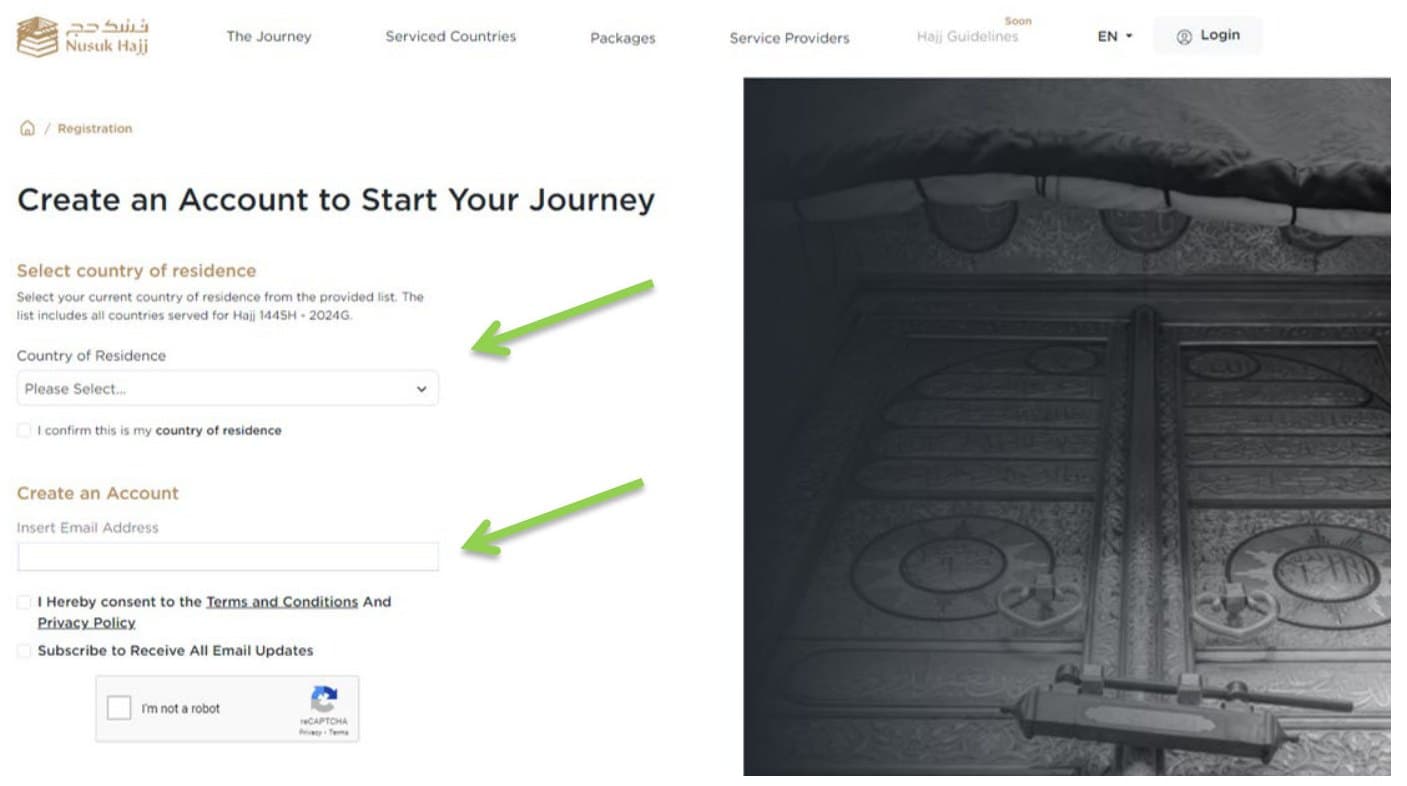
- Start your journey on the Nusuk Hajj home page by selecting "Start Registration".
- Select your country of residence, tick the box to confirm it, and type in your email address.
- Enter the one-time password (OTP) sent to the email address you provided. The OTP expires in 5 minutes.
- Confirm your email address and create a password, entering it twice.
- Log in to your account with your email address and new password.
Password requirements
- A minimum of 8 characters.
- At least one lowercase letter.
- At least one uppercase letter.
- At least one number.
- At least one special character (@#$%^&).
- The confirmed password matches the new password.
Step 2: Upload Documents
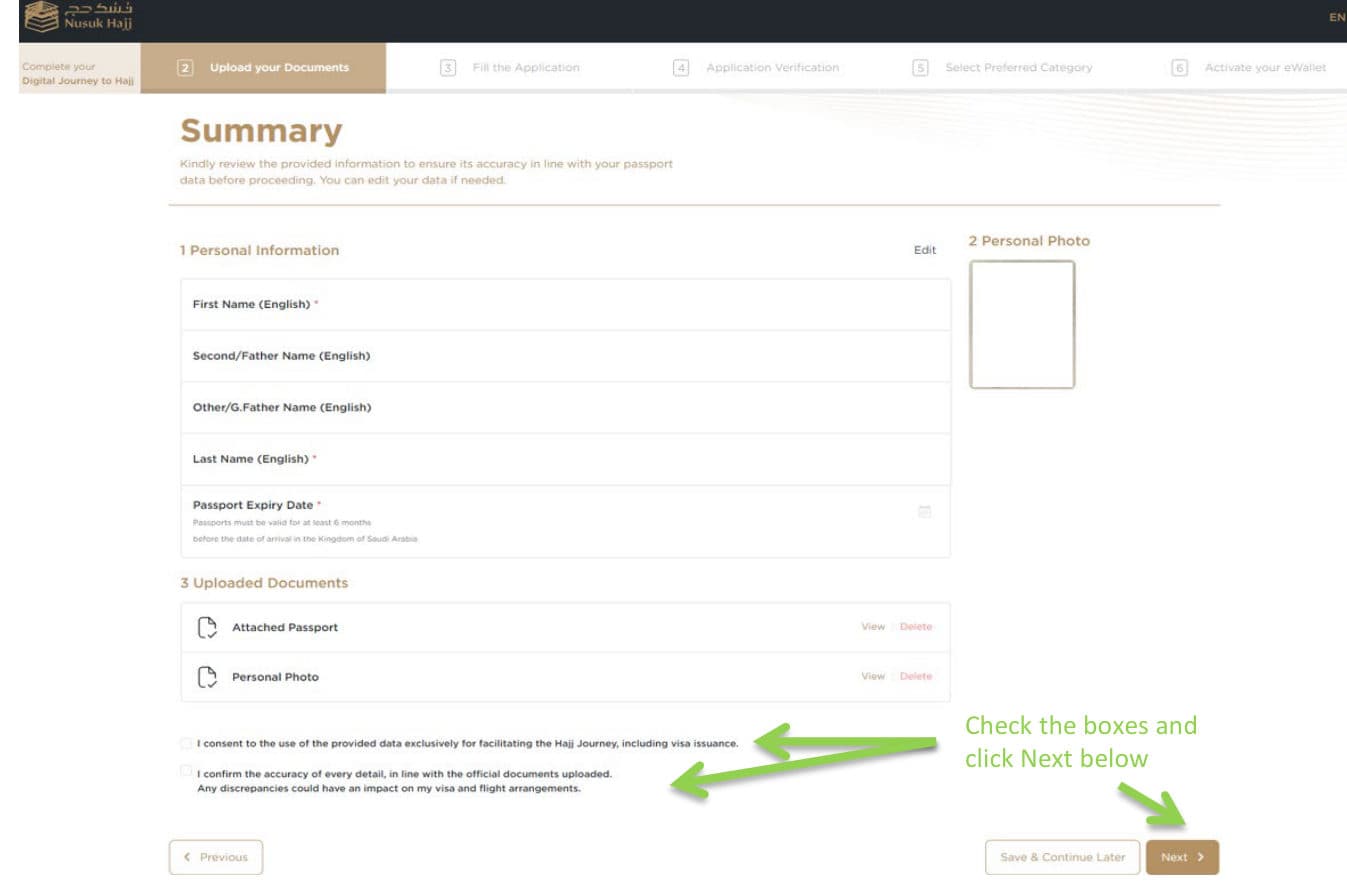
- Upload your documents: your passport, a personal photo, and proof of residence. An uploading guide opens before you start, and each section shows you how to upload its document.
- Review the summary of your answers and uploaded attachments. Tick the two confirmation boxes and click "Next".
- Click "Continue to Submit" to confirm your submission.
| Document | Format | Dimensions | File size | Guidance |
|---|---|---|---|---|
| Passport | PNG or JPG | Maximum 800 × 400 pixels | Up to 1 MB | Make sure the main page of your passport is clearly visible in the photo. |
| Personal photo | PNG or JPG | Maximum 200 × 200 pixels | Up to 18 KB | Must be consistent with passport image guidelines: a white background and formal attire. |
| Proof of residence | PNG or JPG | Maximum 800 × 400 pixels | Up to 1 MB | If you do not have a residence permit, upload an employment contract, driver's licence, lease agreement, property ownership document, work visa, or a bank statement. |
Your passport must be valid for at least 6 months before your date of arrival in the Kingdom of Saudi Arabia.
Resizing Your Images in Windows Paint
If your files are too large, you can resize them in pixels using Windows Paint. The required sizes are: passport 800 × 400 pixels (1 MB max), personal photo 200 × 200 pixels (up to 18 KB), and proof of residence 800 × 400 pixels (1 MB).
- Open the photo you would like to resize in Paint (you can either open it with Paint or paste it into Paint).
- Click the "Resize" button in the "Image" section of the toolbar.
- Make sure "Pixels" has a black dot next to it. If not, click the circle next to "Pixels" so your changes are measured in pixels.
- In the "Resize and Skew" window, make sure the "Maintain Aspect Ratio" box is unchecked.
- In the "Horizontal" and "Vertical" fields under "Resize", enter the appropriate values (for example, 200 for both height and width).
- Click "OK" to resize your photo.
- Save your resized image by clicking "File" and selecting "Save As".
- Choose a location to save your photo and give it a name.
- It is best to save in JPG format, but PNG is also accepted.
- Click "Save" to save your resized photo.
Step 3: Fill the Application
Complete the application form page by page, clicking "Next" after each one. Fields marked with an asterisk are required, and you can use "Save & Continue Later" at any point.
Contact details
- Email, mobile contact number, Saudi mobile number, and social status.
- Emergency contact full name and number.
- Street address, home address, P.O. box, zip or postal code, and apartment or house number.
- The nearest embassy to you.
Occupational details
- Occupation, current employer, previous employer, and name of sector.
- Work contact number.
Arrival details (to the best of your knowledge)
- Expected entry date to the KSA.
- Total expected days in the KSA.
- Expected travel method.
Submitting Your Application
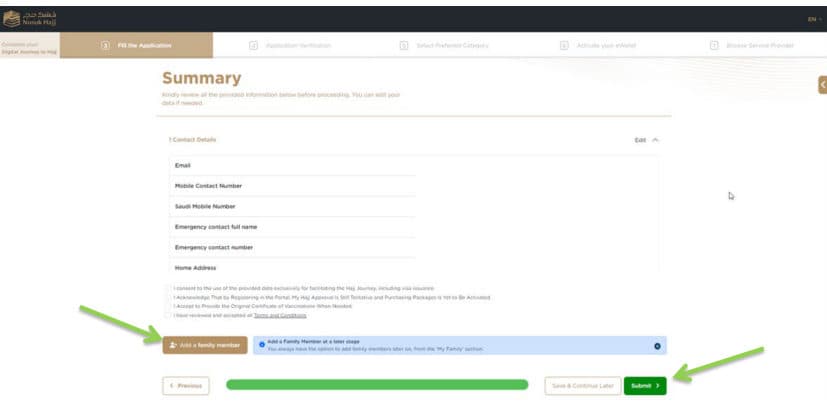
- Scroll to the bottom of the Summary page and tick the confirmation boxes. Here you can add family members now, or do it at a later stage from the "My Family" section.
- If you decide to add a family member at this point, enter their email address, their relationship to you ("This member is my"), and their country of residence.
- Click "Submit" to submit your application. A message confirms it was submitted successfully and is under review, and you will be notified once verification is concluded.
- You can log in at any time to view your application status and profile, and to add family members.
It is recommended to create your own account first and then add your family members, to make sure you can book together.
The confirmations on the Summary page
- I consent to the use of the provided data exclusively for facilitating the Hajj journey, including visa issuance.
- I acknowledge that by registering in the portal, my Hajj approval is still tentative and purchasing packages is yet to be activated.
- I accept to provide the original certificate of vaccinations when needed.
- I have reviewed and accepted all Terms and Conditions.
Adding Family Members After Creating Your Account
- From your profile menu, click "My Family".
- Select "Add a new family member".
- Follow the steps and enter the required information: your family member's email address, their relationship to you, and their country of residence.
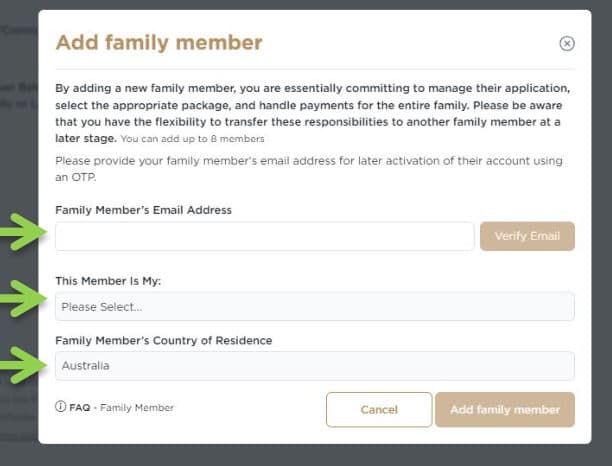
By adding a family member, you commit to managing their application, selecting the appropriate package, and handling payments for the entire family. You can transfer these responsibilities to another family member at a later stage. Your family member's email address is used to activate their account later with an OTP. You can add up to 8 members.
Help and Support
Refer to the FAQ Help & Support pages on hajj.nusuk.sa, as they are constantly updated with the latest information. The FAQs cover the platform, registration, family members, packages, and booking.
Live Chat
Connect with live agents instantly for help with your Hajj-related questions.
Support Email
Write to Support@hajj.nusuk.sa.
Support Centers
Book an appointment at the nearest branch for in-person support.
Social Media
Connect through Nusuk Hajj's official social media channels for assistance and updates.
Call Center
Call 966 9200 31201.
Disclaimer
This guide is offered for informational purposes only, to help you prepare for Hajj 2024. While Al Bait Guests endeavours to provide accurate and useful information, it does not guarantee the accuracy, completeness, or suitability of the content. Please research and verify the information independently before making decisions or taking action. Al Bait Guests accepts no responsibility for any consequences, losses, or damages arising from the use of or reliance on this information.